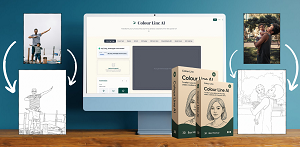
AI Line Art Generator review. AI coloring page market is growing fast and so is the number of tools claiming to make it easy to cash in. After two weeks of hands on testing with the AI Line Art Generator, uploading pet photos, travel pictures and even a blurry birthday snapsnot. This review is based entirely on real expertience not a recycled sales pitch.
Here’s what I found and more importantly, who this tool actually makes sense for and who should look elsewhere.
Disclosure: This post contains affilaite links. If you click and make a purchase. I may earn a small commission at no extra cost to you.
What is the AI Line Art Generator?
The AI Line Art Generator is a browser based tool built for one very specific purpose i.e. converting your photos into clean, print ready line art the kind you had find in a coloring book. No photoshop, no illustration skills, no manual tracing. You upload a photo adjust a couple of settings and within about 20 seconds you have a black and white outline ready to sell or print.
Whats sets it apart from generic image editors is its focus on the coloring page market. The output is optimized for high resolution PDF and SVG formakts the excat file type preferred by Etsy buyers and Amazon KDP publishers. It also includes a built-in mockup generator, which is something that genuinely stands out at this price point.
Think of it as a focused, capable tool, it is not trying to be a full design suite. It wants to take you from a photo to a sellable product in under five minutes and in testing. It largely delivers on that promise.
Who is This Actually Built For?
After testing across several use cases, here’s an honest breakdown of who will ge the most out of this tool.
Etsy and Amazon KDP Sellers
This is the primary audience and it shows in every designs decision. The export formats the mockup generator the line weight presets everthing is geared toward getting you to a publishable, sellable product quickly. If you are already selling digital downloads or planning to start the time savings alone could justify the investment within the first week.
Parents, Teachers and Educators
Creating a custom worksheet or coloring activity from a real photo say a class pet or a memorable field trip. It used to require artistic skill or expensive design work. This tool makes it a two minute task. In testing a photo of a dog was turned into a children’s coloring page that came out remarkably clean with none of the noisy, look you get from free online converters.
Creative Side-Hustlers
If you have been looking for a low barrier way to start generating passive income from creative work, this fits well. You are not writing code or learning complext software. You are curating photos, running them through a tool and uploading finished products to a marketplace. The learning cuve is genuinely shallow. That said, if you are professioanl illustrator who needs fine arts control or you want text to image generation rather than photo conversion. You will likely want a more versatile tool.
Hands On Testing: What Was Tested and What Was Found
The Photos Used for Testing
Testing covered five different photo types to push the tool limits
- A pet portrait (high contrast, clear subject)
- A landscape shot (complex background)
- A family photo (multiple subjects)
- A simple product photo (clean studio lighting)
- A busy street photo (lots of competing detail)
What Worked Really Well
The pet portrait was genuinely impressive. The AI stripped the background cleanly, defined the textrue as elegant line strokes and produced something you had see listed on Etsy. The product photo also came out beautifully clean studio lighting meant sharp edges and output that needed zero touch up. The line weight settings make a noticeable difference. “Kids Mode” produced thicker, bolder lines perfect for young colorers. Switching to fine detail mode for the same image gave a result more suitable for adut zen style coloring books. That level of control within a simple interface is genuinely useful.
Where It Struggled
The busy street photo was messy. The AI could not decide what to keep and what to simplify producing too many competing lines. The fmialy photo had a similar issue multiple overlapping subjects confused the edge detection. In both cases, cropping the photo first (focusing one one clear subject) fixed the problem completely.
The Mockup Generator
This was the standout highlight. After generating line art, you can preview it on a mock coloring book cover, a printed page and even a tablet screen professional looking listing images without needing canva or photsoph.
Step by Step: From Photo to Sellable Product
Step 1 – Choose the Right Photo
High contrast images with a single clear subject work best. Think a pet against a plain wall, a person against an open sky, a flower with a blurred background.
Step 2 – Upload and Choose Your Line Style
Drop your image into the dashboard. You will see two main controls. Line details level and a processing button. Pick think lines for children’s coloring books and thin fine lines for adult page. Both markets sell well on Etsy and KDP.
Step 3 – Genrate and Review
Processing takes between 15 and 25 seconds. Preview the result at 100% zoom before downloading this is where you will catch any problem areas that need a crop and re-run. Most images come out clean on the first try about two in tem will need a second pass.
Step 4 – Export and Create Your Listing
Download your file as a high resolution PDF best for KDP and best for print on demand. Then jump into the mockup generator to create three or four listing images. at this point you are ready to upload to Etsy or publish on Amazon KDP.
Comparison: AI Line Art Generator Vs. Top Competitors
| Feature/Tool | AI Line Art Generator | Color Bliss | Media.io Line Art | Fotor AI |
| Primary Use Case | Coloring Pages + Passive Income | Coloring pages & books | Line art for design/print | AI art + photo editing |
| Photo to Line Art | Yes | Yes | Yes | Yes |
| Text Prompt to Art | No | Yes | No | Yes |
| Built in Mockup Generator | Yes | No | No | No |
| Commercial License Included | Yes | Yes (Paid Plans) | Yes | Yes (Pro+) |
| Free Plan Available | Free Trial | Free Trial Only | Free Credits | Free Basic Plan |
| Starting Price (Paid) | One time (Launch Offer) | $7/Month | Credit-based | $8.99/Month |
| Outpu Formats | PDF, SVG | PDF, PNG | PNG, JPG | PNG, JPG |
| Line Weight Control | Kids/Adult Mode | Multiple Styles | Limited | Limited |
| Etsy/KDP Ready Output | Yes | Yes | Partially | Partially |
| Best For | Sellers & Passive Income | Coloring Book Creators | Designers & artists | Multi purpose creatives |
Pros and Cons
Pros
- Speed is real under 25 seconds per image in every test.
- Line weight presets are thoughtful and produce noticeably different, market- ready results.
- The mockup generator is a genuine differentiator saves real time and money.
- Commercial licensing is included without any additional steps or payments.
- SVG export is a big deal for print on demand sellers it scales infinitely without quality loss.
Cons
- Complex, busy photos need pre-cropping to get clean result this adds a step for some images.
- No text to image capability you need an actual photo to start you can’t generate from a prompt.
- There is no cloud storage or project history download your files immediately after generating.
Is the Passive Income Potential Real?
The AI Line Art Generator makes creating coloring pages very fast but fast creation does not automaitcally translate to sales. You still neeed to understand Etsy SEO, price your products correctly and build a catalog that covers enough, niches to attract traffic.
A single coloring page on Etsy might sell for $2 to $4 as a digital download. If you produces 50 pages in a weekend mandalas seasonal content. You are building a catalog that can generate consistent monthly income with minimal ongoing effort.
Conclusion
The AI Line Art Generator does exactly what it promises and it does it better than most free alternatives tested. The build in mockup generator alone puts it ahead of several paid competitors. The SVG export and clean line weight control show that this was built by people who understand the digital products marketplace, not just image processing.
If you are serious about building a digital products business and you have a good photo library to work with this is worth trying. The 30 day money back guarantee means the risk is genuinely low. Try it on ten photos list them on Etsy and see what happens.
Get Instant Access to AI Line Art Generator Now
Please Note: This blog contains affiliate link, which means that if you click on a link and make a purchase. I may earn a small commission at no additional cost to you.

I am Vivek, a digital marketer and blogger based in India with 3+ years of experience testing online tools and software.